The World Wide Web (commonly shortened to the Web) is a system of interlinked, hypertext documents accessed via the Internet. With a web browser, a user views web pages that may contain text, images, videos, and other multimedia and navigates between them using hyperlinks.
>>>> Hypertext is text, displayed on a computer, with references (hyperlinks) to other text that the reader can immediately follow, usually by a mouse click or keypress sequence
These pages are written in Hypertext Markup Language (HTML).
Every website has an address or Uniform Resource Locator (URL). The URL is formed by the protocol, domain, directory and the document name.
The World Wide Web was created in 1989 by Sir Tim Berners-Lee, working at CERN in Geneva, Switzerland.
Web Browser
A web browser is a software application that enables a user to display and interact with text, images, videos, music and other information typically located on a Web page at a website on the World Wide Web or a local area network.
Some of the Web browsers are:
• Internet Explorer
• Mozilla Firefox
• Safari
• Opera
Some of the search engine:
- Yahoo
- Google
- AltaVista
- Hot Bot
The function of search engine:
- To find out information ( image, text, video, music ect)
Wednesday, May 6, 2009
Wednesday, April 29, 2009
Form 2: Internet
THE INTERNET
The internet or the Net is the world’s largest computer network which connects millions of computer all over the world. Many organizations including private as well as government agencies, educational institutions and individuals are connected to the Internet.
More than one billion people around the world use the internet daily for a variety of reasons, including the following:
• Communicate with and meet other people
• Access a wealth of information, news, and research findings
• Shop for goods and services
• Bank and invest
• Take a class
• Access sources of entertainment and leisure, such as online games, videos, books and magazines
• Share information
Advantages of the Internet
1. Data and information rich, including a range of media.
2. Anyone can publish online (tripod.com and other hosting sites)
3. Learners can become researchers because of easier access to data
4. Search engines that are fast and powerful
5. Easy to use.
6. Smaller, faster, cheaper all the time
Disadvantages of the Internet
1. Information overload.
2. No librarians for quality control(with some exceptions, like Kids Click! And other sites for children).
3. Need for quality control in the data that student find and use.
4. Search engine that show result base on who pays the most.
5. Not enough training for effective use.
6. Push to upgrade constantly.
INTERNET REQUIREMENTS
Basic requirements needed to access the internet :
1. Network Interface Card ( NIC )
A network interface card is a computer circuit board that is installed in a computer so that it can be connected to a network.

2. Access Account
New subscriber needs to subscribe for an account from the service provider (ISP). There are several listed internet service providers in Malaysia such as JARING, TELEKOM MALAYSIA - TMnet, MAXIS - maxis.net and TIME.COM - time.net.
There are two ways of accessing the internet:
a. Direct access:
User computers are directly connected to the internet through a local network server
b. Dial-up:
Accessing the internet is made by making a call through the telephone line to the ISP
3. Wireless Network Interface Card
Is a network card which connects to a radio-based computer network. It uses an antenna to communicate through microwave. A WNIC can operate in two modes known as infrastructure mode and ad hoc mode. In an infrastructure mode network the WNIC needs an access point while an ad hoc mode network the WNIC does not require an access point.
4. Modem ( internal and external )
It is a device that enables a computer transmits data over telephone or cable lines. Computer information is store digitally, whereas information transmitted over telephone lines is transmitted in the form analog waves. A modem converts between these two forms. There are two types of modem, external and internal modem.
External modem can be attached to any computer that has an RS-232 port. An internal modem is an expansion board that can be inserted into vacant expansion slot in a computer.


5. Hub / Switch
A hub is a device acting as the cable center of a network that uses to connect segments of LAN and has either 8 or 16 port. Hub broadcasts the data that it receives from one port to all of its port.
A switch can also connect multiple communication lines and it can receive packets from different protocol. Switch is more intelligent than a hub as it will on only deliver the data to the particular port. This actually helps to make the network significantly faster. It filters and forward packers between a LAN segments.

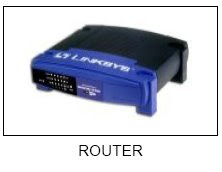
6. Router
A router is attached to two or more networks an forwards Packets form one network to another. It acts as a junction between two or more networks to butter and transfer data packets among them.
7. Wireless Access Point
Wireless access point or AP is a device that connects wireless communication devices together to form a wireless network. It is usually connects to a wired network and can relay data between wireless and wired devices.


Monday, April 20, 2009
Form4: Exercise Software2
1. State the function of OS
2. State thedifference interface of OS
3. State the types of application software
4. Describe the use of application software
5. Give 3 an example of utility programmes and state the usage of each example
2. State thedifference interface of OS
3. State the types of application software
4. Describe the use of application software
5. Give 3 an example of utility programmes and state the usage of each example
Wednesday, April 15, 2009
Form 2: Exercise Network
1. What is computer network?
2. State 3 benefit of computer network
3. State the network devices
4. List the 3 type of computer network
- Describe the LAN network
- Describe the MAN network
- Describe the WAN network
5. Describe the Star topology and give 2 advantage and disadvantage of star topology
6. Describe the Ring topology and give 2 advantage and disadvantage of ring topology
7. Describe the Bus topology and give 2 advantage and disadvantage of bus topology
2. State 3 benefit of computer network
3. State the network devices
4. List the 3 type of computer network
- Describe the LAN network
- Describe the MAN network
- Describe the WAN network
5. Describe the Star topology and give 2 advantage and disadvantage of star topology
6. Describe the Ring topology and give 2 advantage and disadvantage of ring topology
7. Describe the Bus topology and give 2 advantage and disadvantage of bus topology
Monday, April 13, 2009
Form4: Exercise Software
1. State the definition of software
2. State the categories of software
3. State the differencess between System softwareand application software
2. State the categories of software
3. State the differencess between System softwareand application software
Wednesday, April 8, 2009
form 2: Network Topology
1. Star topology
A star topology consists of a central host which acts as the centre, and all nodes connect to the host. A star topology is also known as star network.A star network must have a host which acts as the centre - can be a server, hub or router. In a star network, every node will not connect to the neighbouring nodes.Every node must connect to the host in order to communicate.The host will control the flow of communication in the network.
Advantages of star topology :
a) It is easy to implement. You only add nodes to the host.If one of the nodes fails, the star network can still function as long as the host is working.
b) The failure of a node does not affect the entire LAN. If the host fails, the network will fail to function.
c) There are no disruptions to the network when connecting or removing devices.
d) The network can be extended by adding new devices to the host or nodes.
e) Troubleshooting is easy when the host fails. Simply repair or replace the host and the network will continue to function.
Disadvantages of star topology :
a) If the host fails, the entire LAN will be affected.
b) Network speed decreases when the number of nodes increases.
c) Troubleshooting is difficult when one of the nodes fails.
d) A host must be installed to control the network.
2. Ring topology
A ring topology consists of all computers and other devices that are connected in a loop. Ring topology is also known as a ring network.
Advantages of ring topology :
a) Troubleshooting is easy when one of the nodes fails.
b) Repair or remove the failing nodes and the network will continue to function.
Disadvantages of ring topology :
a) Implementation is difficult. Network administrator has to terminate the entire network to install a new node between existing nodes.
b) A failing node will affect the entire LAN. If one of the nodes fails, the network will fail to function.
c) Network speed decreases when the number of nodes increases.
3. Bus topology
A Bus networks are very common in Local Area Networks (LAN). A bus network must have a common backbone (the central cable) to connect all devices. A bus topology is also known as a bus network.
Advantages of bus topology :
1. Easy implementation. New devices can be added to the backbone or to the existing nodes.
2. Failure of a node doesn't affect the entire LAN.
3. No disruptions to the network when connecting or removing devices.
4. Network can easily be extended, by adding new devices to the backbone or existing nodes.
Disadvantages of bus topology :
1. If the backbone fails, the entire bus network will be affected.
2. Network speed decreases when the number of nodes increases.
3. Troubleshooting is difficult when one of the nodes fails.
A star topology consists of a central host which acts as the centre, and all nodes connect to the host. A star topology is also known as star network.A star network must have a host which acts as the centre - can be a server, hub or router. In a star network, every node will not connect to the neighbouring nodes.Every node must connect to the host in order to communicate.The host will control the flow of communication in the network.
Advantages of star topology :
a) It is easy to implement. You only add nodes to the host.If one of the nodes fails, the star network can still function as long as the host is working.
b) The failure of a node does not affect the entire LAN. If the host fails, the network will fail to function.
c) There are no disruptions to the network when connecting or removing devices.
d) The network can be extended by adding new devices to the host or nodes.
e) Troubleshooting is easy when the host fails. Simply repair or replace the host and the network will continue to function.
Disadvantages of star topology :
a) If the host fails, the entire LAN will be affected.
b) Network speed decreases when the number of nodes increases.
c) Troubleshooting is difficult when one of the nodes fails.
d) A host must be installed to control the network.
2. Ring topology
A ring topology consists of all computers and other devices that are connected in a loop. Ring topology is also known as a ring network.
Advantages of ring topology :
a) Troubleshooting is easy when one of the nodes fails.
b) Repair or remove the failing nodes and the network will continue to function.
Disadvantages of ring topology :
a) Implementation is difficult. Network administrator has to terminate the entire network to install a new node between existing nodes.
b) A failing node will affect the entire LAN. If one of the nodes fails, the network will fail to function.
c) Network speed decreases when the number of nodes increases.
3. Bus topology
A Bus networks are very common in Local Area Networks (LAN). A bus network must have a common backbone (the central cable) to connect all devices. A bus topology is also known as a bus network.
Advantages of bus topology :
1. Easy implementation. New devices can be added to the backbone or to the existing nodes.
2. Failure of a node doesn't affect the entire LAN.
3. No disruptions to the network when connecting or removing devices.
4. Network can easily be extended, by adding new devices to the backbone or existing nodes.
Disadvantages of bus topology :
1. If the backbone fails, the entire bus network will be affected.
2. Network speed decreases when the number of nodes increases.
3. Troubleshooting is difficult when one of the nodes fails.
Sunday, April 5, 2009
Form4 Exercise: Area 2 (COMPUTER SYSTEM)
Topic: Overview Computer System
1. Define what is computer systems.
2. State the meaningof input, process, output and storage
3. Draw the information processing cycle ( block diagram )
4. Describe the information processing cycle which include input, process, output and storage
Topic: Data Representation
1. State the relationship of data representation: bit, byte and character
Topic: Introduction to Binary Coding
1. Explain 3 the function of ASCII code
Topic: Data Measurement
1. State the units of data measurement:
- Bit -Byte - Kilobyte(KB) -Megabyte(MB) -Gigabyte(GB) -Terabyte(TB)
Topic: Clock Speed Measurement
1. State the unit of clock Speed Measurement
- Megahertz (MHz)
- Gigahertz (GHz)
Topic: Hardware
A. Input Devices
1. List 2 input devices used for ecah category: text, graphic, audio and video
B. Output Devices
1. List 2 output devices used for text, graphic audio and video
C. Motherboard
1. What is CPU?
2. What is expansion slots
3. What is expansion cards
4. What is RAM slots
5. State the usage of each port and connector
1) SERIAL PORT
2) PARALLEL PORT
3) USB PORT
4) FireWire PORT
5) SPECIAL PURPOSE PORTS:
- MIDI port
- SCSI port
- IrDA port
6. Describe the subcomponent of CPU and Explain how data is processed by CPU
D. Storage
1. State the two category of storage devices
2. What the meaning of primary storage
3. What the meaning of secondary storage
4. State 3 differencess of ROM and RAM
4. State the type of secondary storage and give an examlpe of each type.
1. Define what is computer systems.
2. State the meaningof input, process, output and storage
3. Draw the information processing cycle ( block diagram )
4. Describe the information processing cycle which include input, process, output and storage
Topic: Data Representation
1. State the relationship of data representation: bit, byte and character
Topic: Introduction to Binary Coding
1. Explain 3 the function of ASCII code
Topic: Data Measurement
1. State the units of data measurement:
- Bit -Byte - Kilobyte(KB) -Megabyte(MB) -Gigabyte(GB) -Terabyte(TB)
Topic: Clock Speed Measurement
1. State the unit of clock Speed Measurement
- Megahertz (MHz)
- Gigahertz (GHz)
Topic: Hardware
A. Input Devices
1. List 2 input devices used for ecah category: text, graphic, audio and video
B. Output Devices
1. List 2 output devices used for text, graphic audio and video
C. Motherboard
1. What is CPU?
2. What is expansion slots
3. What is expansion cards
4. What is RAM slots
5. State the usage of each port and connector
1) SERIAL PORT
2) PARALLEL PORT
3) USB PORT
4) FireWire PORT
5) SPECIAL PURPOSE PORTS:
- MIDI port
- SCSI port
- IrDA port
6. Describe the subcomponent of CPU and Explain how data is processed by CPU
D. Storage
1. State the two category of storage devices
2. What the meaning of primary storage
3. What the meaning of secondary storage
4. State 3 differencess of ROM and RAM
4. State the type of secondary storage and give an examlpe of each type.
Subscribe to:
Posts (Atom)