2.4 Netiquette
2.4.1 Explain the meaning of Netiquette.
Netiquette is etiquette on the Internet. Since the Internet changes rapidly, its netiquette does too, but it's still usually based on the Golden Rule. The need for a sense of netiquette arises mostly when sending or distributing e-mail, posting on Usenet groups, or chatting. To some extent, the practice of netiquette depends on understanding how e-mail, the Usenet, chatting, or other aspects of the Internet actually work or are practiced.
2.4.2 List out the Dos and Don’ts while communicating online.
a) Do unto others, as you'd have others do unto you.
Be polite and courteous at all times. Remember that you're not communicating with a computer screen, but with a human being who has thoughts and feelings just like you. So, always think of the person on the receiving end of your messages.
b) Do not TYPE ALL IN CAPITAL LETTERS for emphasis.
IT LOOKS LIKE YOU ARE SHOUTING. If you need to emphasize a word, use asterisks, like *this* or lines, like _this_.
c) Remember that the written word is hard to interpret.
When you speak to someone, that person can hear the tone of your voice. If they can see you, they can take visual clues from your face and body to better
understand your meaning. All of this is lost in text, and sometimes responses can come across as mean or rude, even when you did not intend them this way. This is the reason some people use emoticons (visual clues) in their e-mails, it saves a lot of confusion.
d) Be careful not to use rude or bad language online.
Many providers will terminate your account.
e) Don't break any laws.
When you're on the net, follow the same rules of behaviour that you would in real life. Remember, if it is against the law in the real world, it is against the law in cyberspace.
f) Be universal.
Other users have different Web browsers, different online services, different e-mail programs etc. So don't, for example, send out e-mail with text formatting -- boldface, italics, indentations, etc. -- because many other programs will not be able to read the formatting and the recipients will receive your e-mail filled with muddled codes.
g) Be brief whenever possible.
No one wants to read through a lot of unnecessary information. If you are replying to an e-mail, try editing out unimportant information and anything that is repeated.
h) Always identify yourself.
If your parents require you to use an online name instead of your real one, that's fine - use your online name consistently. Never send e-mail without including your name at the bottom of the e-mail. Similarly, don't post forum messages without identifying yourself, this is seen as rude.
i) Make a good impression.
Remember that the written word is the only way you can represent yourself online, so spelling and grammar count. If you are going to be writing a large
amount of text for other people to see, make sure you break it up using paragraphs, it will make it easier on the eye for those that will read it.
j) Be patient with newcomers.
Once you have become an Internet expert, it is easy to forget that you started out as a newbie too. Learning the rules of cyberspace is much like learning a new language; it takes practice, and includes making mistakes. So if you come across someone else's mistakes on the net, don't put them down, just politely point them in the right direction for guidance (send them a copy of these rules to get them started on their way!).
2.4.3 Adhere to netiquette in various forms of online communications.
• Listing netiquette items:
o Avoid spamming
• Spam is a term used on the Internet to refer to unsolicited e-mail and Usenet postings. These messages are usually intended to entice the recipient into buying a product or service of some kind or into participating in a get-rich-quick scheme.
o Avoid Flaming
• Abusive or insulting massages sent using the internet.
• Do not send rude or offensive e-mails or postings. It's bad manners and can get seriously out of hand (flame wars). So don't flame others and if you are flamed, do not respond: you will never win. If you are flamed in a forum or chat room, or if you receive hateful e-mail, let your parents or teachers know.
o Use emoticons wisely
Basic Emoticons
:) or :-)
Happy
:-/ or :\
Confused
:( or :-(
Sad
:Q or :-Q
Questioning
:] or :-]
Really Happy
:S or :-S
At a loss for words
:[ or :-[
Really Sad
:@ or :-@
Shock or screaming
:D or :-D
Laughing
:O or :-O
"Uh Oh" or "oh no"
Wednesday, May 13, 2009
Wednesday, May 6, 2009
Form 2: Internet Application
The World Wide Web (commonly shortened to the Web) is a system of interlinked, hypertext documents accessed via the Internet. With a web browser, a user views web pages that may contain text, images, videos, and other multimedia and navigates between them using hyperlinks.
>>>> Hypertext is text, displayed on a computer, with references (hyperlinks) to other text that the reader can immediately follow, usually by a mouse click or keypress sequence
These pages are written in Hypertext Markup Language (HTML).
Every website has an address or Uniform Resource Locator (URL). The URL is formed by the protocol, domain, directory and the document name.
The World Wide Web was created in 1989 by Sir Tim Berners-Lee, working at CERN in Geneva, Switzerland.
Web Browser
A web browser is a software application that enables a user to display and interact with text, images, videos, music and other information typically located on a Web page at a website on the World Wide Web or a local area network.
Some of the Web browsers are:
• Internet Explorer
• Mozilla Firefox
• Safari
• Opera
Some of the search engine:
- Yahoo
- Google
- AltaVista
- Hot Bot
The function of search engine:
- To find out information ( image, text, video, music ect)
>>>> Hypertext is text, displayed on a computer, with references (hyperlinks) to other text that the reader can immediately follow, usually by a mouse click or keypress sequence
These pages are written in Hypertext Markup Language (HTML).
Every website has an address or Uniform Resource Locator (URL). The URL is formed by the protocol, domain, directory and the document name.
The World Wide Web was created in 1989 by Sir Tim Berners-Lee, working at CERN in Geneva, Switzerland.
Web Browser
A web browser is a software application that enables a user to display and interact with text, images, videos, music and other information typically located on a Web page at a website on the World Wide Web or a local area network.
Some of the Web browsers are:
• Internet Explorer
• Mozilla Firefox
• Safari
• Opera
Some of the search engine:
- Yahoo
- AltaVista
- Hot Bot
The function of search engine:
- To find out information ( image, text, video, music ect)

Wednesday, April 29, 2009
Form 2: Internet
THE INTERNET
The internet or the Net is the world’s largest computer network which connects millions of computer all over the world. Many organizations including private as well as government agencies, educational institutions and individuals are connected to the Internet.
More than one billion people around the world use the internet daily for a variety of reasons, including the following:
• Communicate with and meet other people
• Access a wealth of information, news, and research findings
• Shop for goods and services
• Bank and invest
• Take a class
• Access sources of entertainment and leisure, such as online games, videos, books and magazines
• Share information
Advantages of the Internet
1. Data and information rich, including a range of media.
2. Anyone can publish online (tripod.com and other hosting sites)
3. Learners can become researchers because of easier access to data
4. Search engines that are fast and powerful
5. Easy to use.
6. Smaller, faster, cheaper all the time
Disadvantages of the Internet
1. Information overload.
2. No librarians for quality control(with some exceptions, like Kids Click! And other sites for children).
3. Need for quality control in the data that student find and use.
4. Search engine that show result base on who pays the most.
5. Not enough training for effective use.
6. Push to upgrade constantly.
INTERNET REQUIREMENTS
Basic requirements needed to access the internet :
1. Network Interface Card ( NIC )
A network interface card is a computer circuit board that is installed in a computer so that it can be connected to a network.

2. Access Account
New subscriber needs to subscribe for an account from the service provider (ISP). There are several listed internet service providers in Malaysia such as JARING, TELEKOM MALAYSIA - TMnet, MAXIS - maxis.net and TIME.COM - time.net.
There are two ways of accessing the internet:
a. Direct access:
User computers are directly connected to the internet through a local network server
b. Dial-up:
Accessing the internet is made by making a call through the telephone line to the ISP
3. Wireless Network Interface Card
Is a network card which connects to a radio-based computer network. It uses an antenna to communicate through microwave. A WNIC can operate in two modes known as infrastructure mode and ad hoc mode. In an infrastructure mode network the WNIC needs an access point while an ad hoc mode network the WNIC does not require an access point.
4. Modem ( internal and external )
It is a device that enables a computer transmits data over telephone or cable lines. Computer information is store digitally, whereas information transmitted over telephone lines is transmitted in the form analog waves. A modem converts between these two forms. There are two types of modem, external and internal modem.
External modem can be attached to any computer that has an RS-232 port. An internal modem is an expansion board that can be inserted into vacant expansion slot in a computer.


5. Hub / Switch
A hub is a device acting as the cable center of a network that uses to connect segments of LAN and has either 8 or 16 port. Hub broadcasts the data that it receives from one port to all of its port.
A switch can also connect multiple communication lines and it can receive packets from different protocol. Switch is more intelligent than a hub as it will on only deliver the data to the particular port. This actually helps to make the network significantly faster. It filters and forward packers between a LAN segments.

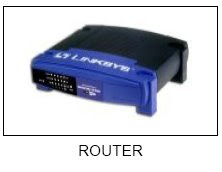
6. Router
A router is attached to two or more networks an forwards Packets form one network to another. It acts as a junction between two or more networks to butter and transfer data packets among them.
7. Wireless Access Point
Wireless access point or AP is a device that connects wireless communication devices together to form a wireless network. It is usually connects to a wired network and can relay data between wireless and wired devices.

Monday, April 20, 2009
Form4: Exercise Software2
1. State the function of OS
2. State thedifference interface of OS
3. State the types of application software
4. Describe the use of application software
5. Give 3 an example of utility programmes and state the usage of each example
2. State thedifference interface of OS
3. State the types of application software
4. Describe the use of application software
5. Give 3 an example of utility programmes and state the usage of each example
Wednesday, April 15, 2009
Form 2: Exercise Network
1. What is computer network?
2. State 3 benefit of computer network
3. State the network devices
4. List the 3 type of computer network
- Describe the LAN network
- Describe the MAN network
- Describe the WAN network
5. Describe the Star topology and give 2 advantage and disadvantage of star topology
6. Describe the Ring topology and give 2 advantage and disadvantage of ring topology
7. Describe the Bus topology and give 2 advantage and disadvantage of bus topology
2. State 3 benefit of computer network
3. State the network devices
4. List the 3 type of computer network
- Describe the LAN network
- Describe the MAN network
- Describe the WAN network
5. Describe the Star topology and give 2 advantage and disadvantage of star topology
6. Describe the Ring topology and give 2 advantage and disadvantage of ring topology
7. Describe the Bus topology and give 2 advantage and disadvantage of bus topology
Monday, April 13, 2009
Form4: Exercise Software
1. State the definition of software
2. State the categories of software
3. State the differencess between System softwareand application software
2. State the categories of software
3. State the differencess between System softwareand application software
Wednesday, April 8, 2009
form 2: Network Topology
1. Star topology
A star topology consists of a central host which acts as the centre, and all nodes connect to the host. A star topology is also known as star network.A star network must have a host which acts as the centre - can be a server, hub or router. In a star network, every node will not connect to the neighbouring nodes.Every node must connect to the host in order to communicate.The host will control the flow of communication in the network.
Advantages of star topology :
a) It is easy to implement. You only add nodes to the host.If one of the nodes fails, the star network can still function as long as the host is working.
b) The failure of a node does not affect the entire LAN. If the host fails, the network will fail to function.
c) There are no disruptions to the network when connecting or removing devices.
d) The network can be extended by adding new devices to the host or nodes.
e) Troubleshooting is easy when the host fails. Simply repair or replace the host and the network will continue to function.
Disadvantages of star topology :
a) If the host fails, the entire LAN will be affected.
b) Network speed decreases when the number of nodes increases.
c) Troubleshooting is difficult when one of the nodes fails.
d) A host must be installed to control the network.
2. Ring topology
A ring topology consists of all computers and other devices that are connected in a loop. Ring topology is also known as a ring network.
Advantages of ring topology :
a) Troubleshooting is easy when one of the nodes fails.
b) Repair or remove the failing nodes and the network will continue to function.
Disadvantages of ring topology :
a) Implementation is difficult. Network administrator has to terminate the entire network to install a new node between existing nodes.
b) A failing node will affect the entire LAN. If one of the nodes fails, the network will fail to function.
c) Network speed decreases when the number of nodes increases.
3. Bus topology
A Bus networks are very common in Local Area Networks (LAN). A bus network must have a common backbone (the central cable) to connect all devices. A bus topology is also known as a bus network.
Advantages of bus topology :
1. Easy implementation. New devices can be added to the backbone or to the existing nodes.
2. Failure of a node doesn't affect the entire LAN.
3. No disruptions to the network when connecting or removing devices.
4. Network can easily be extended, by adding new devices to the backbone or existing nodes.
Disadvantages of bus topology :
1. If the backbone fails, the entire bus network will be affected.
2. Network speed decreases when the number of nodes increases.
3. Troubleshooting is difficult when one of the nodes fails.
A star topology consists of a central host which acts as the centre, and all nodes connect to the host. A star topology is also known as star network.A star network must have a host which acts as the centre - can be a server, hub or router. In a star network, every node will not connect to the neighbouring nodes.Every node must connect to the host in order to communicate.The host will control the flow of communication in the network.
Advantages of star topology :
a) It is easy to implement. You only add nodes to the host.If one of the nodes fails, the star network can still function as long as the host is working.
b) The failure of a node does not affect the entire LAN. If the host fails, the network will fail to function.
c) There are no disruptions to the network when connecting or removing devices.
d) The network can be extended by adding new devices to the host or nodes.
e) Troubleshooting is easy when the host fails. Simply repair or replace the host and the network will continue to function.
Disadvantages of star topology :
a) If the host fails, the entire LAN will be affected.
b) Network speed decreases when the number of nodes increases.
c) Troubleshooting is difficult when one of the nodes fails.
d) A host must be installed to control the network.
2. Ring topology
A ring topology consists of all computers and other devices that are connected in a loop. Ring topology is also known as a ring network.
Advantages of ring topology :
a) Troubleshooting is easy when one of the nodes fails.
b) Repair or remove the failing nodes and the network will continue to function.
Disadvantages of ring topology :
a) Implementation is difficult. Network administrator has to terminate the entire network to install a new node between existing nodes.
b) A failing node will affect the entire LAN. If one of the nodes fails, the network will fail to function.
c) Network speed decreases when the number of nodes increases.
3. Bus topology
A Bus networks are very common in Local Area Networks (LAN). A bus network must have a common backbone (the central cable) to connect all devices. A bus topology is also known as a bus network.
Advantages of bus topology :
1. Easy implementation. New devices can be added to the backbone or to the existing nodes.
2. Failure of a node doesn't affect the entire LAN.
3. No disruptions to the network when connecting or removing devices.
4. Network can easily be extended, by adding new devices to the backbone or existing nodes.
Disadvantages of bus topology :
1. If the backbone fails, the entire bus network will be affected.
2. Network speed decreases when the number of nodes increases.
3. Troubleshooting is difficult when one of the nodes fails.
Subscribe to:
Posts (Atom)